
Order Management for Ecommerce: A Complete Guide for Small Businesses
Your online shop is doing well, so you start selling on Amazon. The extra orders are welcome. But without connected stock records, ecommerce order management now involves checking what’s sold in each place. Miss an update, and you could promise two customers the same item.
With businesses selling through three platforms on average, according to DHL’s 2026 E-Commerce Trends Report, those checks can multiply as you expand. This guide explains how to keep orders connected to stock from checkout through to returns, and what to look for in software that helps you manage that work.

Table of Contents
- What Is Ecommerce Order Management?
- What are Key Features of an Ecommerce Order Management System?
- What are Common Challenges in Ecommerce Order Management?
- Ecommerce Order Management Best Practices
- OMS vs ERP vs Inventory Management Software: What's the Difference?
- B2B and Wholesale Ecommerce Order Management
- What Ecommerce Order Management Software Should You Choose?

What Is Ecommerce Order Management?
Ecommerce order management is the process of receiving, processing, fulfilling and tracking customer orders across your sales channels. It connects each order with the stock and fulfilment work needed to complete it, so you can follow its progress through to delivery and handle any returns.
An order management system (OMS) is the software your team uses to manage that process. Orders from your online shop and other channels appear in one place. Your warehouse team can see what needs dispatching, while customer service can check delivery progress without chasing updates.
Say you sell supplements through your website and a wholesale portal. A trade customer orders 40 tubs, leaving fewer available for online shoppers. Those committed units need to come out of the quantity your website offers for sale, even while they’re still on the warehouse shelf.
If those systems don’t share updates, you could sell the same stock twice. Your team then has to reconcile the orders manually and explain a delay or cancellation to a customer.
What is the Ecommerce Order Management Process Flow?
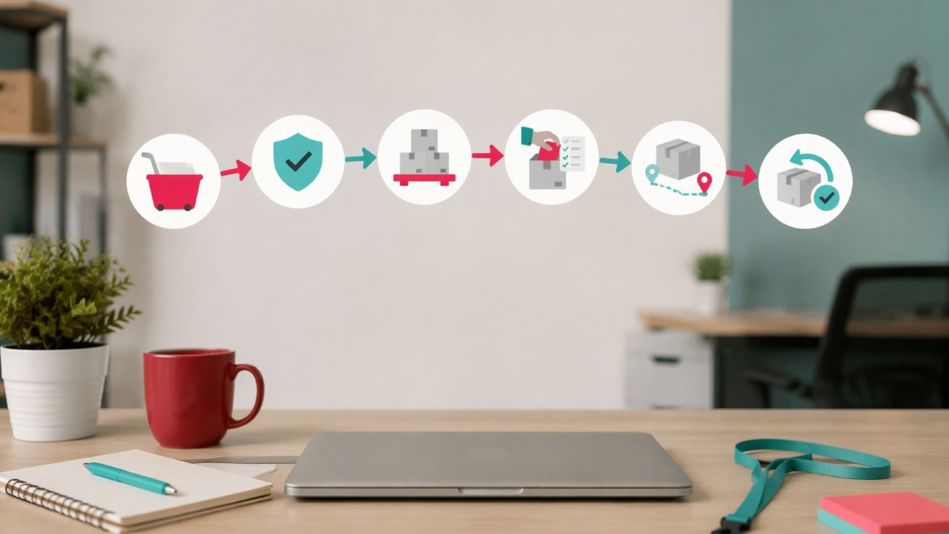
The ecommerce order management process flow moves an order from checkout through fulfilment, with checks before goods leave your warehouse and a process for handling returns. The following six stages cover tasks that some frameworks divide into seven steps by separating picking and packing.
We’ll follow a backpack retailer selling through Shopify and Amazon as an example to understand the ecommerce order management process flow steps.
Step 1: Order Capture
Order capture records each purchase, including the products, quantities, prices, delivery address and payment details. For example, one customer buys a navy backpack via your Shopify store, while another buys one on Amazon. Both orders enter the OMS with separate references, ready for your team to process without copying details between platforms.
Step 2: Validation and Fraud Check
Validation checks confirm that an order is ready to fulfil. Your checkout or payment service verifies authorisation and flags potential fraud, with suspicious orders held for review. Delivery details need checking too. For example, correcting an incomplete postcode on the Shopify order prevents the warehouse from preparing a parcel it can’t dispatch.
Step 3: Inventory Allocation
Inventory allocation reserves stock at your warehouse or fulfilment partner after each sale and updates what’s available across connected channels. Starting with 20 navy backpacks, the two purchases leave 18 available to sell. Both orders can now move to fulfilment without those units remaining on offer to other shoppers.
Step 4: Pick, Pack and Prepare
Picking and packing gets the correct products ready for shipment. A pick list tells warehouse staff which items and quantities each order needs. Barcode scanning can catch a black backpack selected instead of the navy one. Staff then pack each order securely and move it to the dispatch area.
Step 5: Shipping and Tracking
Your shipping integration can compare carrier rates and generate a label for a service that meets the promised delivery date. Once the parcel is collected, your system sends automated tracking updates to keep the customer informed. Your team can also check the shipment record and contact the carrier if a delivery is delayed.
Step 6: Returns and Reverse Logistics
Returns handling records what comes back and how the customer’s request is resolved. A return merchandise authorisation (RMA) links the returned backpack to its original order. Staff inspect it before updating inventory records. Only saleable items become available again, and any refund or exchange is recorded against the purchase. Customer service should be able to track the return’s progress throughout.
What are Key Features of an Ecommerce Order Management System?
Here are key capabilities you should look for when selecting an ecommerce order management system:
- Centralised orders: Multichannel order management lets your team review incoming orders in one place, without logging into each sales platform separately.
- Real-time inventory sync: Share stock changes across connected channels so staff know what’s available and don’t promise units already committed elsewhere.
- Automated order routing: Assign orders to suitable warehouses or fulfilment partners using stock availability and shipping costs, reducing manual allocation.
- Automatic pick lists: Give warehouse staff clear instructions on products and quantities, helping them prepare orders accurately without rewriting information.
- Shipping integration: Compare carrier rates and generate labels from order details. Tracking information flows back to each order, reducing customer service follow-ups.
- Returns management: Track returned stock and refunds together to resolve problems before they escalate.
A 2025 survey by the National Retail Federation and Happy Returns found 71% of respondents were less likely to shop with a retailer again after a poor returns experience.
- Reporting and demand forecasting: Track order accuracy, fulfilment times, return rates and inventory turnover. Demand forecasting uses sales history to estimate stock needs by product and channel, helping you plan purchases.
What are Common Challenges in Ecommerce Order Management?
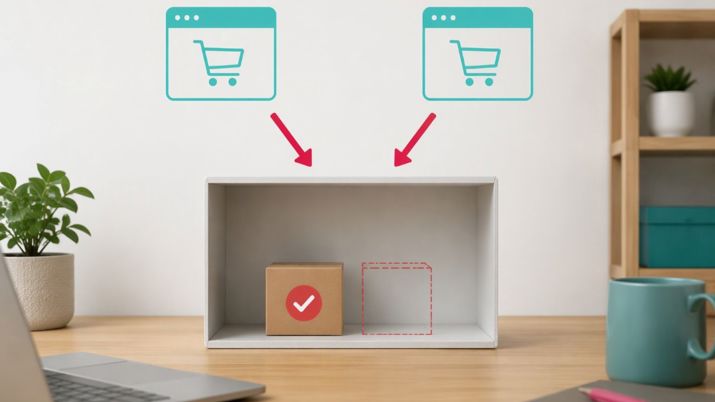
The most common ecommerce order management challenges arise when sales channels and stock records fall out of sync. Your team ends up checking information manually, and small delays become harder to recover from as order volumes grow. These are some of the problems you might recognise:
- Overselling across channels: If your sales channels don’t share stock updates quickly enough, you can accept orders for products that have already sold elsewhere. Your team then has to explain the mistake to customers and cancel orders they were expecting to receive.
On marketplaces, those cancellations also affect your seller record. Amazon requires a cancellation rate below 2.5% for orders you fulfil yourself, and exceeding that threshold can put your listings at risk.
- Disconnected systems create admin: You copy orders into your accounts software, then update a stock spreadsheet. Correcting one mistake means revisiting several records, taking time away from fulfilment.
- Stock figures become unreliable: Deliveries aren’t recorded promptly, or damaged goods remain counted as saleable stock. Poor inventory accuracy leaves staff checking shelves before they can confirm what’s available.
- Returns remain unfinished: Refunds and stock updates happen separately. Without a clear returns process, a saleable item can sit in the returns area while your website still shows it as unavailable.
- Growth outpaces your team: Order volumes rise, but every purchase still needs the same manual checks. During a promotion, those checks can create a dispatch backlog even when you have enough stock.
Ecommerce Order Management Best Practices

The following best practices can help you minimise errors and improve order management efficiency:
- Keep inventory updates flowing: Sync every channel with your inventory system in real time wherever supported. Test whether sales and cancellations update availability correctly, and check returns and stock adjustments. Assign someone to investigate failed updates each day.
- Manage all orders in one place: Connect every sales channel to one order queue. Give held orders a named owner and review them daily, so a payment query doesn’t quietly turn into a missed dispatch.
- Automate routine tasks: Set up automatic confirmations, pick lists, shipping labels and tracking updates. Check the triggers too. By default, Shopify sends a shipping confirmation when an order is marked as fulfilled, so make sure that status update reflects the order’s actual progress.
- Forecast before stock runs low: Review sales by SKU and channel, accounting for seasonal peaks and planned promotions. Unleashed’s Advanced Inventory Manager (AIM) helps turn demand forecasts into purchasing plans, so you can prepare for higher demand before it arrives.
- Review reorder points and safety stock: Base reorder points on average demand during supplier lead times, plus a safety stock buffer. Recalculate whenever demand or supplier performance changes to keep purchasing decisions in line with current conditions.
- Make returns consistent: Tell customers how to request a return and when to expect a refund. Internally, assign responsibility for inspections and stock updates. Keep returned items unavailable for sale until someone confirms they’re fit to sell.
- Review performance weekly: Track order management KPIs such as order accuracy, fulfilment cycle time, on-time delivery, return rates and inventory turnover. Investigate changes by channel or product, and assign a specific action when performance slips.
OMS vs ERP vs Inventory Management Software: What's the Difference?
An OMS coordinates customer orders through fulfilment. Inventory management software tracks stock and helps plan replenishment. Enterprise resource planning (ERP) connects wider business functions, including finance and purchasing.
These categories overlap, so choosing software means checking which jobs it handles and how it works with your existing systems. Here’s an overview of when each of these is relevant:
| Software | When it’s worth considering |
|---|---|
| OMS | Orders arrive across multiple channels and your team needs to coordinate fulfilment or track progress without checking each platform. |
| ERP | You need finance and operations in one wider system. Setup requirements depend on the modules you choose and how much customisation you need. |
| Inventory management software | Stock records are unreliable or purchasing decisions lead to shortages and excess stock. You need better control over quantities and replenishment. |
An ERP may include order and inventory modules, while an inventory platform may also manage sales orders. Check the depth of each capability during a demo, including what’s built in and what needs an integration.
If your accounting software already meets your needs, a connected inventory and order platform like Unleashed may be enough. Unleashed combines stock control and order management and integrates with Xero and QuickBooks, allowing you to improve fulfilment without migrating to a different accounting system.
B2B and Wholesale Ecommerce Order Management
B2B ecommerce order management handles online purchases from business customers under agreed pricing and payment terms. If you sell directly to consumers too, your system needs to manage both channels using shared inventory records while supporting the following wholesale requirements:
- Wholesale ordering patterns: B2B orders are often larger and less frequent than consumer purchases. Regular customers may reorder on a schedule, making demand easier to forecast. A stockout can leave a retailer’s shelves empty and put your wholesale account at risk.
- Account pricing and invoicing: Apply each account’s agreed pricing automatically and enforce minimum order quantities. Record credit terms against the account, and link invoices for partial shipments and credit notes for returns to the relevant order. That makes billing queries easier to resolve when deliveries are split.
- Stock planning across channels: Manage both channels in one system with a shared inventory pool. Each confirmed order should update availability. Set automated reorder alerts using combined demand, including scheduled trade purchases, so replenishment reflects both sides of the business.
- Customer self-service: Unleashed’s B2B ecommerce portal shows live stock availability and account pricing. Buyers can reorder previous purchases and check order status themselves, helping you serve more wholesale customers with fewer routine calls and emails.
What Ecommerce Order Management Software Should You Choose?
The right ecommerce order management platform should keep orders and stock in sync while fitting the way your team works. To judge whether a platform can do that, ask the vendor to walk through examples from your business during a demo, using these five questions to guide the discussion:
- Does it connect orders and stock? Ask the vendor to show how an order reserves stock and changes available quantities. Then cancel it and check the update. Your team should be able to rely on one shared record without reconciling separate systems.
- Does it support every sales channel? List your channels and check the available integrations. Confirm which connections are native and which require third-party connectors. Ask how quickly stock updates reach each channel and who resolves failed updates.
- What will implementation involve? Request a timeline covering data migration and staff training. Confirm whether the vendor or a partner provides onboarding support. Ask for a named contact and a clear list of tasks your team will need to complete.
- Will it accommodate growth? Check limits on order volumes, SKU counts, users and warehouses. Ask whether adding sales channels or locations would require a higher plan or a migration to another product.
- What will it cost overall? Get a quote covering subscriptions, onboarding, integrations, training and essential add-ons. Calculate the first-year total, including your staff’s setup time, and compare it with the admin hours you expect to save.
Unleashed brings inventory and multichannel orders into one platform, with onboarding support to help your team get started. Start a free trial to explore how orders affect stock availability and whether the workflow suits your team.
When Your Ecommerce Platform's Order Management Is No Longer Enough
You’ve outgrown your ecommerce platform’s order tools when order-related errors become more frequent and your team has to spend too much time fixing them. If a new channel would make those problems harder to manage, it’s time to address them before you expand.
Similarly, if you're managing wholesale and D2C orders in two completely separate workflows, with no shared view of stock across both, a central inventory system, rather than two separate workflows, could be the fix.
Start with a problem that regularly costs your team time. Pick a recent order that was difficult to fulfil and show a software provider where the process broke down. Ask them to demonstrate how their system would handle it. You should be able to see which manual tasks it removes and what your staff would still need to do.
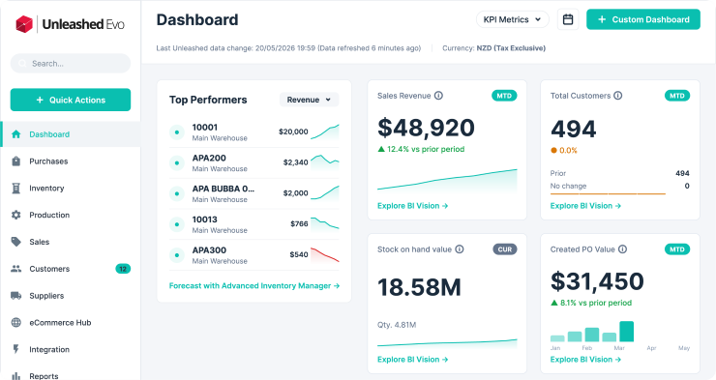
Unleashed’s ecommerce inventory software brings orders and stock records together across connected channels and warehouses. If keeping that information consistent is what’s holding your team back, it’s a practical option to test.
Start a free trial with the order you’ve chosen, or book a chat with the team to work through it together. You should leave knowing whether it solves your current problem and gives you enough confidence to take on the next opportunity.
Frequently Asked Questions
What is order management for ecommerce?
Ecommerce order management is the process of receiving and fulfilling online orders, from checkout through delivery and any returns. It connects each order to accurate stock information and gives your team a shared view of what needs to happen next, even when you sell through several channels.
What are the 7 steps of order fulfilment?
The seven steps of order fulfilment are: order capture, validation, stock allocation, picking, packing, shipping and returns handling. This guide combines picking and packing into one stage, giving six stages overall. Both descriptions cover the same work from checkout onwards.
What is the 80/20 rule in ecommerce?
The 80/20 rule suggests that roughly 80% of revenue comes from 20% of your products or customers. The exact split varies, so check your own sales data. You can use ABC inventory analysis to identify products contributing most to sales and prioritise keeping them in stock.
Which CMS is best for ecommerce?
There’s no single best ecommerce CMS. Shopify is worth considering if you want hosting and platform updates handled for you. WordPress with WooCommerce offers more control over how your store is built, but you’ll need to arrange maintenance. In either case, check compatibility with your order management software before committing.
How does an OMS differ from inventory management software?
An OMS coordinates customer orders through fulfilment. Inventory management software tracks the stock available to fulfil them and helps plan replenishment. The functions often overlap. Some inventory platforms also manage sales orders, so check the features you need before assuming you have to buy two separate systems.
How much does ecommerce order management software cost?
Costs depend on your order volume and the features you need. When comparing quotes, include the subscription and onboarding fees, and check whether essential integrations or extra capacity cost more. That gives you a clearer idea of what you’ll actually pay during the first year.


