
What Is Distributed Order Management? A Plain-English Guide for Growing Businesses
Adding sales channels and warehouses makes it harder to decide where each order should ship from. That choice affects the delivery times you can offer, which can determine whether customers buy at all. In fact, among US shoppers who abandoned a purchase for reasons other than browsing, 20% cited slow delivery in Baymard Institute’s 2026 research.
If you’re managing multiple channels, a distributed order management (DOM) system might help. It automatically selects a fulfilment location for each order using stock data and your business rules. This guide explains how it works and helps you decide whether your small business needs DOM or whether better inventory management should come first.


What Is Distributed Order Management?
A distributed order management (DOM) system is software that automatically chooses where to fulfil each customer order. It compares stock availability across your locations and applies your business rules to select a suitable warehouse or fulfilment partner.
DOM can be built into an order management system (OMS) or work alongside it. You decide how orders should be allocated, and the software applies those rules as orders are processed.
To make that decision, it considers four main factors:
- Proximity: Which location is closest to the customer’s delivery address?
- Stock availability: Where are the products available now, in the quantities the order needs?
- Cost to serve: Which location can fulfil the order at the lowest shipping cost while meeting the promised delivery date?
- Capacity: Which location has the capacity to pick and pack the order today?

For example, your nearest warehouse might have the product in stock but already be handling as many orders as it can dispatch that day. Your rules can allow the system to select another location that can dispatch on time without requiring your team to make that choice manually for every order. That flexibility helps you get orders out on time when one warehouse is busy, while still taking shipping costs into account when choosing another location.
How Does a Distributed Order Management System Work?
A distributed order management system connects incoming orders with stock data from your fulfilment locations. It checks what’s available and applies your routing rules before passing each order to the selected location. Inventory updates flow back to your sales channels, giving you supply chain visibility as orders are fulfilled.
Imagine you run a small supplement business with stock in Leeds and a third-party logistics (3PL) warehouse in Birmingham. You sell through your website and a wholesale portal. Here’s what your process might look like:
- The order comes in. A customer in Coventry buys two supplements from your website. The connected sales channel passes the order details to your DOM system.
- Available stock is checked. SKU-level tracking shows the quantity available for each product at both locations. Stock already allocated to other orders is excluded from what’s available to sell.
- A fulfilment location is selected. In this example, your rules favour Birmingham because it has both products and can meet the delivery date at a lower shipping cost. The products are reserved for that order.
- The order is fulfilled. The Birmingham provider receives the pick list and prepares the customer’s parcel for dispatch.
- Inventory stays in sync. Available quantities are reduced when stock is reserved, so those units aren’t offered to another buyer. Dispatch then updates stock-on-hand records, with changes shared across your connected sales channels.
If neither location has both products, your rules can allow the order to be split between them or held until everything can ship together. Sending two parcels may increase shipping costs, while holding the order can delay delivery.
Distributed Order Management vs. Traditional Order Management: What's the Difference?
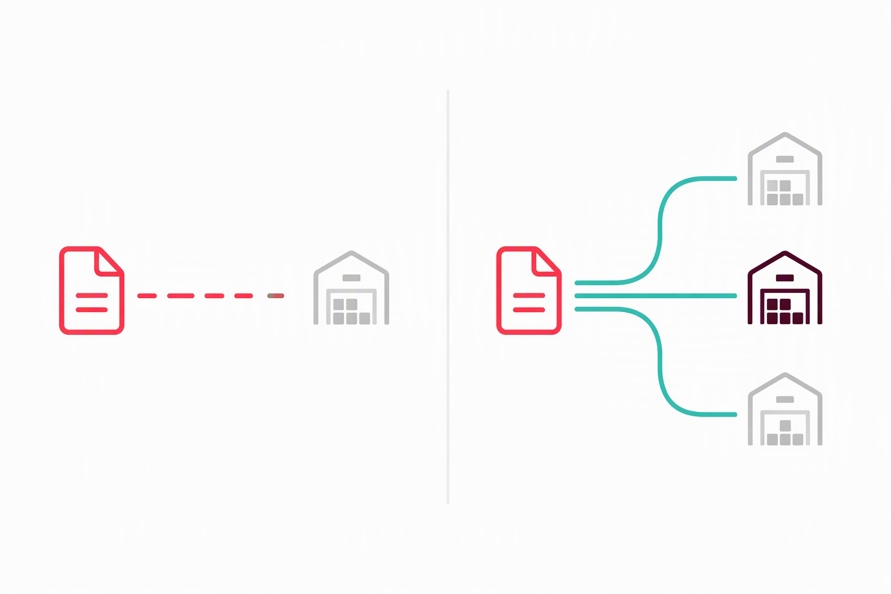
An order management system (OMS) manages orders from receipt through to fulfilment. Distributed order management adds automated decisions about which location should fulfil each order. DOM can be part of an OMS or work alongside it, extending how your business manages fulfilment across multiple locations.
Capabilities vary by product, so “traditional” here means an OMS with basic or fixed routing. Multi-channel sales and partial shipments aren’t exclusive to DOM.
Here’s a summary of differences between the two types of order management systems:
| Feature | Traditional OMS with basic routing | OMS with DOM capabilities |
|---|---|---|
| Sales channels | May handle one channel or connect several | Coordinates fulfilment decisions across connected channels |
| Inventory view | Stock visibility and update frequency depend on integrations | Uses current stock availability across locations to make routing decisions |
| Routing logic | Uses fixed assignments or manual location selection | Evaluates stock, distance, shipping costs and capacity against your rules |
| Order splitting | May support partial shipments, with staff deciding how to fulfil them | Applies rules to split orders across locations or keep items together |
| Best fit | Straightforward fulfilment from one warehouse or predictable location assignments | Operations that need frequent routing decisions across multiple locations |
Suppose your supplement business originally fulfilled every order from Leeds. You’ve since added a fulfilment partner in Birmingham, but your OMS still sends website orders to Leeds by default. Your team has to redirect orders manually when Leeds runs out of stock. With DOM, the system can check Birmingham’s availability and reroute the order automatically, provided that location meets your delivery and cost requirements.
When comparing distributed order management vs order management, consider how often your team has to make those routing decisions manually. If fulfilment is straightforward, your current OMS may be enough. If manual checks are delaying dispatch, check whether it supports DOM capabilities before looking for a replacement.
Key Benefits of Distributed Order Management
Distributed order management can cut shipping costs and delivery times while reducing split shipments and manual routing. It supports inventory optimisation by helping you use available stock across locations. Those improvements depend on accurate stock data and routing rules that reflect your delivery promises. Let’s look at the benefits of DOM more closely.
Lower shipping costs
DOM can compare shipping costs across locations that have the products available. If you dispatch 500 online orders a month, a small saving on each parcel can add up over time. Your rules can favour cheaper options that still meet the promised delivery date.
Faster deliveries
Orders can reach customers sooner when you fulfil them from a nearby location with stock and capacity to dispatch. If your usual warehouse is overloaded, DOM can direct new orders elsewhere, helping you meet delivery dates without waiting for that backlog to clear.
Fewer stockouts and oversells
When your usual warehouse runs out, DOM can route orders to another location with stock. Sharing accurate availability across sales channels also helps prevent overselling. For example, whenever units are reserved for a wholesale order, the system reduces the quantity available to buy across all channels, including your website.
Fewer split shipments
DOM can favour a location that holds every item in an order, allowing you to send everything in one parcel. You can save on postage and packaging, while your customer receives the complete order together instead of waiting for separate deliveries.
Less admin as you grow
More orders don’t have to mean a matching increase in routing work. Once a new sales channel is connected, DOM can allocate its orders using predefined rules, allowing your team to spend more time on demand forecasting and orders that need individual attention.
What Is Distributed Order Management in Retail?

In retail, distributed order management decides which shop or warehouse should fulfil each order. Large retail chains mainly use it to coordinate online fulfilment across their stores. In MIT’s 2026 research, 50% of the 647 supply chain leaders surveyed, mostly from large organisations, identified fulfilment decisions as a strategic challenge.
One common use is ship-from-store, where shop staff dispatch online orders from their own stock to take pressure off a busy warehouse. For buy online, pick up in-store (BOPIS), commonly called click-and-collect, DOM sends the order to the chosen shop and alerts staff to prepare it.
Small businesses face similar decisions when they sell directly to consumers and supply retailers from the same stock.
Imagine a supplement brand with stock in Leeds and Birmingham, selling through its website and a wholesale portal. It launches an online promotion after a trade customer orders 80 tubs. Those tubs are still on the shelf, but they’re already spoken for. The brand’s rules keep them out of the stock offered to online shoppers, while DOM routes website orders based on what’s still available at each location.
If you have two to four fulfilment locations, a good inventory system with order sync may handle those stock allocations. But it’s worth considering a full distributed order management solution if your team has to keep comparing locations and manually redirecting orders throughout the day.
How DOM Routing Rules Work
DOM routing rules are instructions you set to control where orders go. They tell the system which locations to consider and when to choose an alternative. You can favour a particular warehouse, for example, while still allowing orders to go elsewhere if it can’t dispatch them on time.
Here are some examples of routing rules you can use:
- Proximity: Favour locations closer to the customer when other requirements are met.
- Stock availability: Exclude locations without enough available stock and check alternatives.
- Cost-to-serve: Choose the lowest shipping cost that still meets the delivery promise.
- Location priority: Prefer your main warehouse unless stock or cost conditions justify another location.
- Capacity: Stop sending new orders to locations that have reached their daily picking limit.
- Channel allocation: Keep stock aside for wholesale orders so website sales don’t use it.
Suppose a supplement brand prefers its Leeds warehouse because it costs less to fulfil orders there than through its Birmingham 3PL. Once Leeds reaches its daily order limit, a capacity rule can send new orders to Birmingham, provided it has stock and can meet the delivery date. If no location holds the complete order, splitting rules decide whether to use two locations or wait until everything can ship together.
The Prerequisite Most Businesses Miss: Inventory Data Accuracy
DOM can only make reliable decisions when its inventory records reflect the stock available to fulfil an order. A 2026 study published in the 2026 study published in the Journal of Business Logistics found that 64.7% of inventory records examined across 11 stores belonging to a UK grocer didn’t match the physical stock.
An accurate count still has to be combined with current sales commitments. If orders accepted in another system aren’t shared promptly, DOM can see committed stock as available.
Suppose a warehouse holds 50 units of a product and a wholesale customer orders 20. That order sits in a separate sales system that sends updates every 15 minutes. Until the next update arrives, the DOM system shows 50 units available, though only 30 are available for new orders.
An online order for 40 units arrives during that gap. DOM selects the warehouse because it appears to have enough stock to send everything together. But the warehouse can’t fulfil both commitments. Staff may have to send the missing ten units from another location, creating a split shipment that the routing rules were meant to avoid.
The fix starts with making the wholesale commitment visible as soon as it’s accepted. Before adding DOM, you need a shared inventory record that keeps up with orders across your sales channels. Unleashed helps establish that foundation through multi-warehouse stock tracking and inventory sync, bringing those records together so fulfilment decisions can account for commitments made elsewhere in the business.
Common Challenges DOM Solves (And When You Don't Need It Yet)
DOM is worth considering when routine fulfilment decisions are holding up orders or making them more expensive to send. Look at where your team has to step in during a typical week. That should help you judge whether you need automated routing or a better way to keep inventory records in sync.
Here are examples of challenges that DOM can solve:
- Manual routing takes too much time: Staff spend much of the day choosing between fulfilment locations, with orders waiting until someone is available to allocate them.
- Overselling across sales channels: Check whether stock updates are reaching every channel. If they aren’t, inventory sync is the issue to address before investing in routing.
- Shipping costs are unnecessarily high: Orders leave from a distant warehouse even when a closer location has stock and could meet the delivery date for less.
- Growth creates more admin per order: Each new sales channel or fulfilment location adds manual checks and handoffs, so the workload grows faster than order volumes.
Before investing, weigh the time and shipping costs you could save against the cost of implementing and maintaining DOM.
If you fulfil everything from one warehouse and sell through one or two channels at low volume, full DOM may be more than you need. When inventory is straightforward and routing takes only a few minutes a day, an inventory management system with multi-channel order sync is likely to be the more useful next step.
Distributed Order Management vs. Inventory Management Software: Where Does Unleashed Fit?
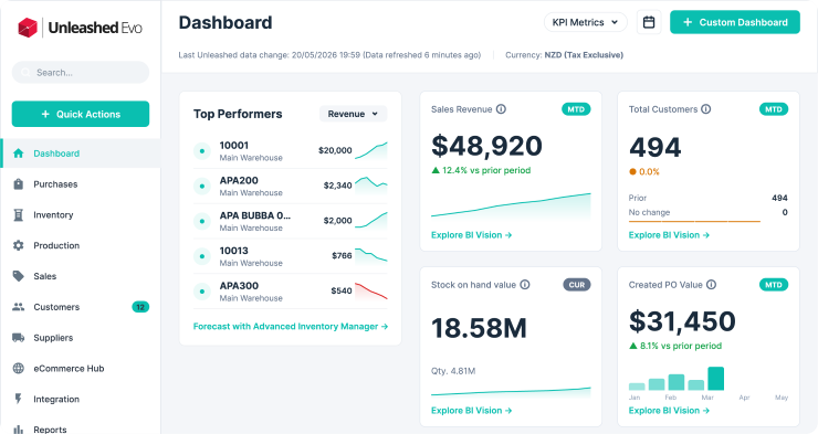
Unleashed brings inventory and order management into one system for growing small and mid-sized businesses. A full distributed order management solution handles the advanced routing more commonly needed by enterprise retailers. If you’re managing two to four fulfilment locations, your next step may be to connect stock records with incoming orders before adding that complexity.
Unleashed tracks stock across warehouses in real time and syncs orders from Shopify, WooCommerce, Amazon and its B2B portal. You can follow an order through to dispatch alongside the stock allocated to it. Your sales and warehouse teams have a shared record to consult when a customer asks what’s available or whether an order has been dispatched.
The same information can guide your next stock purchase, especially when replenishment takes weeks. In Unleashed’s 2026 UK Regional Manufacturing Report, supplier lead times averaged 26 days across its sample of 1,322 UK manufacturing businesses using Unleashed in Q1 2026. The Advanced Inventory Manager (AIM) module helps you plan around your own supplier lead times, supporting demand forecasting and automatically calculating minimum and maximum stock levels to guide reordering.
Start a free 14-day trial and work through an order that reflects how you sell and fulfil today. Then explore how you’d plan the next replenishment. It’s a practical way to see whether Unleashed gives your team the stock visibility and order control it needs.
Frequently Asked Questions
What is distributed order management?
Distributed order management (DOM) uses software to decide where to fulfil an order across multiple locations. It applies business rules to weigh stock availability, delivery distance, fulfilment costs and capacity. The aim is to choose a location that can meet the customer’s delivery requirements at an acceptable cost.
What is the difference between distributed order management and a traditional OMS?
An OMS manages an order’s progress from receipt to fulfilment. DOM focuses on selecting the fulfilment location. A basic OMS may send orders to a preset warehouse, while DOM compares suitable locations using current availability and your routing rules. Capabilities vary between OMS products.
Can you give me an example of distributed order management?
A retailer receives an order for a jacket and shoes. Its nearest warehouse has only the jacket, but another holds both items. If that second warehouse meets the delivery and cost requirements, DOM can send the whole order there under a rule that favours a single shipment.
What is OMS and IMS?
OMS stands for order management system, which manages customer orders through to fulfilment. IMS stands for inventory management system, which tracks stock quantities and movements. The two work together so orders reflect available inventory. Some software combines both functions, so they don’t always require separate systems.
Do small businesses need distributed order management?
Not necessarily. A small business shipping from a single warehouse may only need reliable inventory management and order sync. DOM becomes more useful when staff regularly have to choose between fulfilment locations, and those decisions slow down dispatch. The deciding factor is the work involved in routing orders, rather than employee numbers.


