
Inventory Reporting Techniques with Examples
Once you have full visibility over your inventory management, you can start to see how to grow sales, margins and efficiency throughout your business. According to Meteor Space, “the average U.S retail business has an inventory accuracy of only 66%.”
A good inventory management system allows you to take control of your stock as you purchase, produce and sell goods. But a great one enables you to make measurable improvements to how you run your business.
Here’s everything you need to know about using inventory reporting to analyse — and improve — your business processes.
You can build powerful inventory reports in Unleashed – try our cloud-based inventory reporting software for free today.

What is an Inventory Report?
An inventory report is a catch-all term covering any reports relating to purchase management, production management, what’s on order, in production, in the warehouse and allocated for sale, and sales reporting.
Keeping up-to-date inventory reports helps business owners track the movement and profitability of their stock. Inventory reports vary in format, but the best ones are always clear and comprehensive.
Why is an Inventory Report Important?
It’s essential to create an inventory report to sustain a healthy product business. It enables you to identify problems quickly, control costs and get more satisfied customers.
Identify Problems Quickly
Stock reports (also called inventory records) detail everything that comes into and out of the warehouse. When kept up to date, they can help you identify any problems affecting performance, such as product loss through theft, obsolescence or dead stock.
Optimise Stock Levels
Good inventory reports enable you to identify trends and opportunities. This informs optimal reorder quantities, allowing you to minimise the risk of over- and understocking.
Control Business Costs
Up-to-date inventory records help you keep up with your costs. They can show you which suppliers offer the best deals, freight and transport costs, cost of returns and more, so you can adjust your expenses accordingly.
Inform Business Goals
Inventory records identify the metrics and key performance indicators (KPIs) that can help you when it comes time to set attainable goals so that you can give direction to your business growth.
Maintain Customer Service Standards
Using inventory reports, your customer service team or sales rep will know where to quickly get the right stock and pricing information for customers. If customers face delays and long wait times, they might switch to a competitor who can provide them with the right information and products quickly.
Which Performance Metrics Are Important?
There are hundreds of potential inventory reporting metrics, ranging from the simple to the sophisticated.
At the basic level, inventory metrics track stock that’s coming in and leaving your warehouse. Consistently tracking your inventory allows you to spot trends and gain insights to make better data-driven decisions for your company. Here are six metrics every product business should be using.
1. Sales volume
Sales volume is the number of units sold within a given reporting period. It may be monitored at the level of product, product line, customer, subsidiary or sales region.
2. Sales revenue
Sales revenue is the amount of money that is brought into the business from the sales of products and/or services over a period of time. Revenue is calculated as:

Did you know?
Unleashed customers increased sales volume by 13% on average in 2018. Not only that, but their sales value increased by 25%!
3. Profit
Fundamentally, profit is how much money your business is making. It’s calculated as:

Gross Margin is often used interchangeably with Gross Profit, but the terms are different. When referring to a monetary amount, use Gross Profit; when referring to a percentage or ratio, use Gross Margin instead.
4. Gross Margin
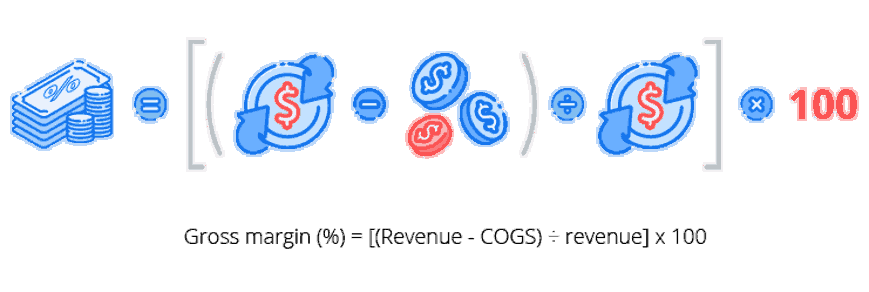
Margin, or gross margin, tells business owners and other stakeholders the percentage of sales revenue remaining after subtracting the cost of goods sold.
Calculating margins helps us to understand the relative profitability of a firm. Gross margins are calculated as:
Did you know?
Great inventory management software can help you better make, manage or move your products — just look at Unleashed customers: they increased their margins by 5% in 2018.
5. Cost of Goods Sold
Cost of goods sold (COGS) tells you how much it costs to produce your products or services.
Knowing your COGS helps you make informed decisions, such as whether your raw material costs are weighing heavily on your overall expenses.
To calculate your cost of goods sold, you need to work out what you spent on the products you sold to your customers. It sounds simple, but with costs fluctuating over time, getting an accurate figure can be tricky. And without an accurate figure, you won’t be sure of the margin you’re making — or what the value of your remaining stock is.
There are three main ways of calculating COGS: FIFO, LIFO and average landed cost.
6. Number of customers
The number of customers gives an indication of performance compared to previous periods. Businesses can group customers based on the value of their purchases and develop plans to serve the requirements of each group.
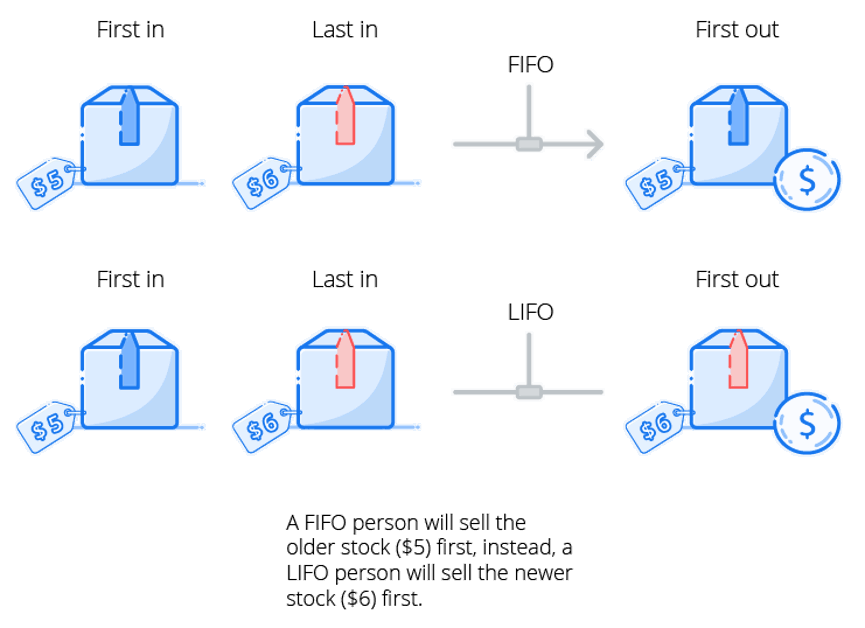
Average landed cost
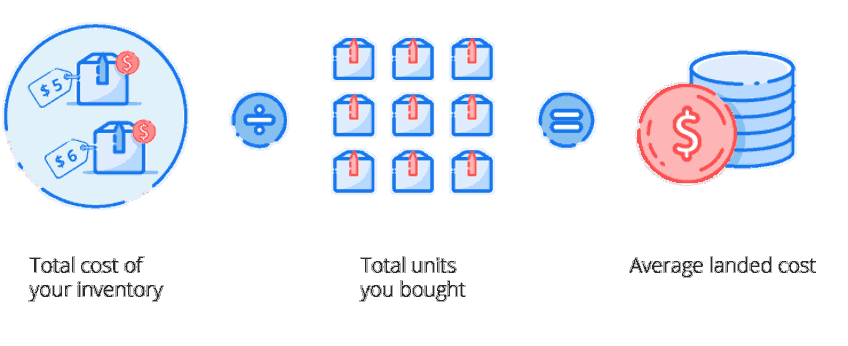
The number of customers gives an indication of performance compared to previous periods. Businesses can group customers based on the value of their purchases and develop plans to serve the requirements of each group.
Did you know?
Unleashed customers experienced 6% growth overall in their customer base from 2017 to 2018!
Types of Inventory Reports
Now that you know which basic metrics you need to be tracking, let’s explore the types of inventory reports that help you monitor detailed performance across purchasing, production, stock and sales.
Purchase Management Reporting
A purchase management report provides a snapshot of how effective the purchasing strategy is. It allows your business to show how its current purchasing activities deliver value for money and realise the company’s goals.
Here are three key metrics to get you started:
1. Average lead time by supplier
Lead time is the difference between the day a purchase order was raised and when it was received. Businesses should aim to reduce lead times as much as possible while still sourcing good-quality products or components. If longer lead times are unavoidable, then accurate forecasting is a must to avoid stockouts or overstocking.
2. Supplier delivery
Delivery in full, on time (DIFOT) is a metric that takes a look at product or service delivery from your suppliers. It shows the percentage of orders you received in full by the requested date, compared to your overall number of orders. DIFOT is calculated as:

Your business also needs to know how often your suppliers don’t deliver orders on time. Although there are always uncertainties involved in the supply chain, frequent overdue or late orders lead to under-optimised supply chains, costing everyone money and reducing customer satisfaction. Calculate the overdue orders with the formula:

3. Supplier returns
Supplier returns are goods returned to your suppliers, or services not used or received by you from your suppliers.
Optimising procurement example
By analysing your purchasing activities, you identify two suppliers that stand out. Supplier A delivers within a short lead time of 3 days but frequently misses out items. On the other hand, Supplier B takes longer to deliver their order, with a lead time of 5 days. However, you find that their DIFOT rate is much higher than Supplier A: they always deliver in a timely fashion, and the delivered quantity always matches what was ordered.
From your purchase management report, you know that although Supplier A seems like a better supplier because of their short lead time, Supplier B always delivers the right products every time.
You adjust your purchasing strategy to take into account the longer lead time, but always end up with the right products that don’t need to be returned.
Production Management Reporting
A comprehensive production management report helps maintain an overview of your business’s production performance and profitability so you can evaluate efficiencies and improve production strategies. Let’s take a look at the key metrics that drive production improvement.
Cycle time
Manufacturing cycle time tells you how much time it takes to convert raw materials into finished goods. It involves the following components:
- Process time — the time used to actually work on the product.
- Move time — the time required to transfer the product from one workstation to another.
- Inspection time — the time spent to check if the product is free from any defect.
- Queue time — the idle time the product spends waiting to be moved, processed, inspected, and shipped.

Production efficiency
Production efficiency measures whether a business is producing the largest amount of goods possible without wasting resources. When a business has production efficiency, they are manufacturing products at a low average total cost.
Efficiency vs Productivity
Efficiency is not the same as productivity. Productivity is about maximising the number of units produced within a given timeframe, while efficiency is about minimising costs and maximising profits for a given level of output.
Production efficiency is calculated as:

Standard output rate is your staff’s normal rate of performance. Operations strategy, technology, job design, the worker’s skill and effort all influence the rate of output.
Wastage
Regardless of what business you’re in, there’s sure to be wastage as a consequence of the business — and not just the physical waste. Here’s a quick refresher on the types of inventory waste you might be accumulating.
Production cost
Production costs detail the total cost of manufacturing a product — including raw materials, third-party assembling costs and operating costs. For manufacturers, production costs typically make up a large part of their total COGS.
Stock Reporting
Without knowing about your stock movements, you could be letting inventory management get the better of you. Stock reports like turnover reports and inventory variance reports can help you keep your products fresh and relevant.
Inventory discrepancy report/inventory variance reporting
Once you’ve completed your stocktake, you might find that there is an inventory discrepancy — a difference between the actual stock and what is reported in your warehouse inventory management software.
Stock discrepancies spell bad news for your business as they often hint at a bigger stock control problem. In this case, businesses should create an inventory variance report to detail the movement of stock between stocktakes and the differences that have occurred. It’s used to analyse stock movement and ensure that all stock is accounted for correctly.
Stocktake discrepancy
Are there any discrepancies in your counted and reported stock levels? Understanding the reasons why this is happening can help your business grow:
- Stock loss due to damage or theft
- Stock is not in the correct location
- Human error during the stocktake process
- Stock is labelled with incorrect identification
- Stock mistaken for a similar product
- Inbound stock not recorded accurately
- Faulty stocktake software or equipment
- Counting using the incorrect unit of measurement
Knowing how much stock to hold
Holding the right amount of inventory is a crucial factor in the success of any product-based business. Keep too much on hand, and you’ll soon find holding costs eating into your margin — not to mention running the risk of your stock becoming unusable before you can sell it.
On the other hand, keeping your levels too lean means increasing the likelihood of stockouts. And you can’t sell what you don’t have.
A perpetual IM system should be capable of reporting on the value of stock on hand at any given time, as well as comparing it to previous periods. It should also tell you your purchase value: that is, how much money you currently have invested in your stock.
Here are some essential metrics to keep in mind when creating a stock report:
1. Inventory turnover
Inventory turnover is a ratio showing how frequently a business has purchased and sold inventory during a given period. It helps a business make well-informed pricing, manufacturing, marketing and purchasing decisions.
The inventory turnover ratio helps a business identify efficiency. It can show:
- How much stock they should actually hold
- Which products are selling well — and which aren’t
- Where deadstock is in the warehouse
- Predict performance and profitability
At the heart of it, inventory is an asset that the business holds with the intent to convert into cash for a profit. However, if an asset is not turned over, working capital gets tied up in stock. If a business uses borrowed capital for purchasing inventory, idle inventory would result in increased finance costs. In addition, inventory not turned over would also contribute to an increase in carrying costs, such as storage costs and insurance costs.
The main reason why inventory turnover rates are important is to determine how successful a company has been in converting their inventory purchases into final sales.
2. Average days to sell
Average days to sell shows how long this stock is sitting in stock on hand before it is sold. To calculate average days to sell:

This ratio will differ between industries, so you should compare it to your own historical results and to the ratios of competitors in the industry.
3. Backorder
The backorder rate is the percentage of orders that cannot be delivered by the scheduled time, but that will eventually be delivered at a later date. Backorders are one of the most important metrics to gauge how well you’re doing when it comes to customer satisfaction — no one wants the hassle of delayed deliveries. To calculate the backorder rate:
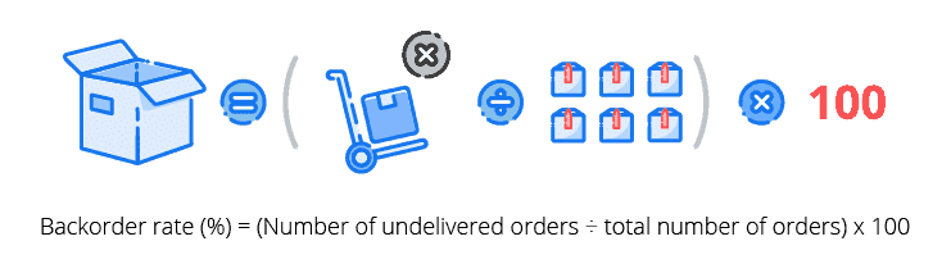
A high backorder rate means your customers have to wait while you attempt to fulfil their order, which negatively impacts customer satisfaction and retention.
4. Fill rate
The fill rate tells you the percentage of your orders that can be satisfied immediately by the available stock on hand. Understanding the fill rate is important because it can indicate customer satisfaction and loyalty. To calculate your inventory fill rate:
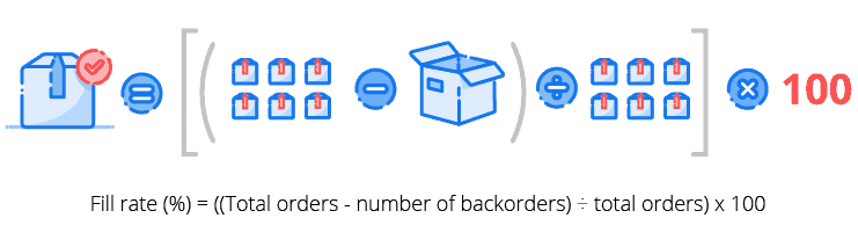
The higher the item fill rate is, the better the inventory performance is. A low fill rate means that your business doesn’t have enough stock on hand to fulfil orders. This might encourage your customers to choose your competitor over you.
5. Aged inventory report
Aged inventory is dated inventory stock that has past its prime selling point and is building up in your warehouse. Aged inventory can pile up, and because it’s old, it can be hard to sell to customers.
An aged inventory report details the key metrics about your stock, in particular:
- How long each item of inventory typically spends in storage before it’s used
- Storage and other maintenance costs incurred when the goods are held in inventory
- The inventory management approach used for each item type
With an aged inventory report, your business will be able to make well-informed purchasing decisions based on how quickly stock moves. This will allow you to focus your attention on products that need it and help you understand how your stock is performing against the industry benchmark.
Stock that is sitting in your warehouse unsold is capital that you can’t use. To free up cash for purchasing and replenishment, you need to get rid of aged inventory.
Sales Order Reporting
A sales order report gives you a bird’s eye view of your sales — how much did you make in a month? How does that compare across different time periods? A sales order report lets you keep a finger on the pulse of your business.
In order to glean more value from your sales report, you need to drill down to some of the following metrics:
1. Sales count per product and product type
A sales count per product report makes it easy to identify the best and worst-performing products. This helps inform procurement decisions. For example, if a product is doing well, you might consider ordering more of it. However, if a product is moving slowly, you might consider selling it at a discount to get rid of excess stock.
A sales count by product type allows you to categorise your products to see how each group contributes to revenue. Businesses use this report to identify broader trends and insights.
2. Average spend per customer
You probably know what your revenue is, but do you know what your average revenue per customer is? To calculate this:

3. Sales per customer or customer group
A sales report by customer or customer group allows you to identify your star customers — and those who aren’t engaging with your brand. This allows you to adjust your marketing and communications strategies accordingly. When you can easily identify the top 20% of your customers who contribute a large portion of your revenue, you’ll be able to actively engage them to drive stronger customer loyalty.
4. Average revenue per order
Average revenue per order, otherwise known as the average order value, measures the average total of every order placed with a merchant over a defined period of time. To calculate this, we use the formula:

5. Repeat order rate
The repeat order rate shows you the percentage of your current customer base that has purchased for a second time or more. This metric is a good indicator of the value you are providing your customers. To calculate it:

A good repeat purchase rate is dependent on the industry. A high repeat order rate indicates your customers are finding value in your business.
Fulfilling sales orders is a crucial step. Identify how well you’re serving your customers and fulfilling orders with these metrics:
1. On-time deliveries
On-time delivery rates measure your business’s ability to honour target shipment dates when fulfilling customer orders. Failing to deliver orders on time can put a strain on your customer relationships in the long term and negatively impact your bottom line. To calculate on-time deliveries:

A low rate of on-time deliveries hints at weaknesses in the order fulfilment process, whether that is picking, packing or shipping. Manual tasks can also lead to higher rates of late deliveries. Good product businesses will mitigate this by using an efficient system, aiming for accurate demand forecasting, implementing efficient warehouse workflows and exercising great inventory control.
>2. Customer returns
The journey doesn’t end once the product is in the customer’s hands. You need to make sure that the customer is satisfied with the product. You can manage this by monitoring customer returns by product to identify any product quality issues, selling problems or customer satisfaction shortfalls. To calculate returns as a percentage of items sold:

Dedicated inventory management software enables quick and accurate reporting across your purchasing, production, stock and sales processes. It offers advanced functionality to give you valuable insight into your business and support your growth.
How to Make an Inventory Report
- There are two ways to create an inventory report: manually or automatically. Using inventory management software, such as Unleashed, helps reduce errors by using real-time data.
- Connect your Point-of-Sales (POS) or Enterprise Resources Planning (ERP) systems to generate comprehensive reports. If you’re creating a manual report, this data will need to be exported from your chosen systems.
- Accuracy in an inventory report is vital. This depends on the underlying data that is used. Ensure all figures are correct and investigate any incorrect occurrences.
- Insert graphs and charts into your report, allowing for the information to be understood and trends to be spotted.
What should an inventory report include?
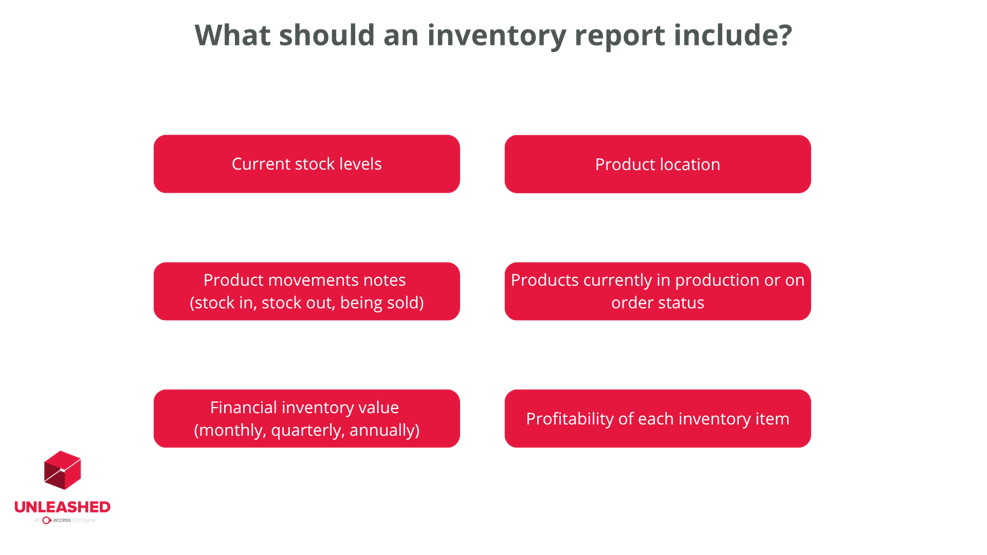
Just like the variety of performance metrics, there are many different elements an inventory management report could include. However, there are six that are vital. Your inventory management report should include:
- Current stock levels of each product on hand
- Detailed notes of product movements – stock in, out and being sold
- Financial value of inventory at a specific time – monthly, quarterly or annually
- Location of each product
- Status on products currently in production or on order
- Detailed notes on the profitability of each inventory item
How Unleashed can increase inventory accuracy
Unleashed’s real-time inventory management software is designed to automate your processes, keep track of your inventory and lift profit margins while saving you time.
Our inventory management software:
- Simplifies stock takes with rolling stock takes
- Gives you total traceability with real-time tracking features
- Get in-depth reporting with Business Intelligence
And much more.
Explore what inventory management software can do for your business and start your 14-day free trial today.
How BCE Catering Equipment maintained inventory accuracy with Unleashed
BCE Catering Equipment, a business-based supplier for kitchen equipment in New Zealand, chose Unleashed after wanting to move to a cloud-based inventory system that wasn’t clunky.
The team are dedicated to bringing new products to the market and with various sales channels, they needed a system that gave them accurate reports. BCE Catering Equipment can work on a true cost basis, maintaining their complete inventory management accuracy.
Frequently Asked Questions
What is an inventory summary?
An inventory summary is an overview of your current stock situation. It typically includes key data points such as total stock on hand, stock value, and product movement trends. This type of report helps business owners quickly assess inventory health, spot discrepancies, and make informed decisions about purchasing, production, and sales. It’s a snapshot that supports strategic planning and operational efficiency.
What are the three main types of reports?
There are three primary types of inventory reports used to track and optimise business performance:
- Purchasing Reports – These track what’s been ordered, from whom, and at what cost. They help identify supplier performance and purchasing trends.
- Production Reports – These detail what’s currently in production, including raw materials used and finished goods output. They’re essential for managing manufacturing workflows.
- Sales Reports – These show what’s been sold, to whom, and at what margin. They help you understand customer demand and profitability across product lines.
Together, these reports give you full visibility over your inventory lifecycle, from procurement to sale.
How do you write an inventory report?
There are two ways to create an inventory report: manually or automatically. Using inventory management software like Unleashed allows you to generate reports using real-time data, reducing errors and saving time.
To write a manual inventory report:
- Export data from your POS or ERP systems.
- Ensure all figures are accurate and investigate any anomalies.
- Include graphs and charts to highlight trends and make the data easier to interpret.
Your report should cover:
- Current stock levels
- Product movements (in, out, sold)
- Inventory value at a specific time
- Product locations
- Items in production or on order
- Profitability of each inventory item
Accuracy is key - your report is only as good as the data behind it.
